

Appearance

Save & Resume Pro
With Save & Resume, a visitor can save a form partway through and finish it later. NXForms emails them a link that opens the form with their answers filled in. Save & Resume comes with NXForms Pro.
Switch it on
Open the form's settings and choose Save & resume. The section is shown in Full mode, and the form needs an Email field.
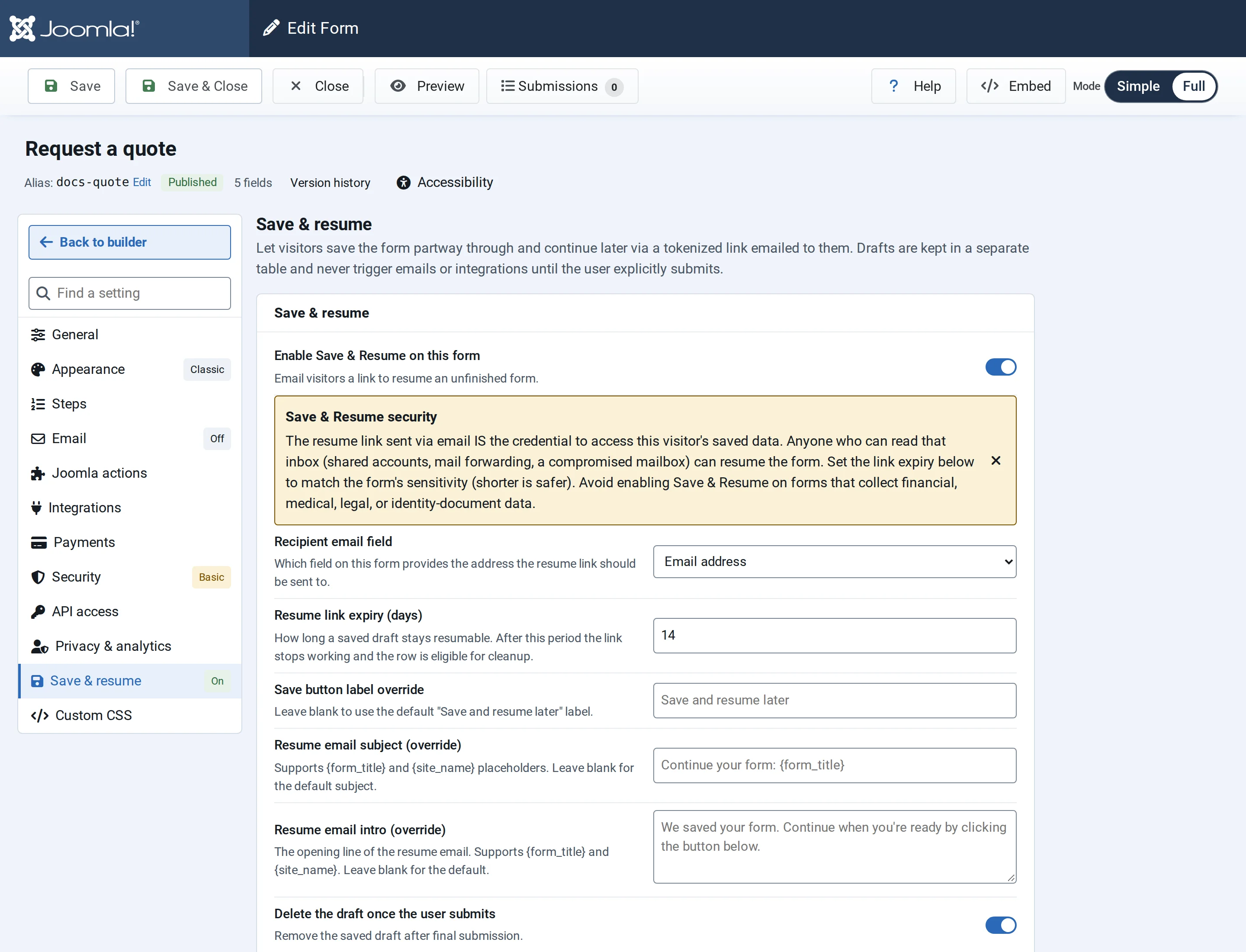
- Enable Save & Resume on this form.
- Recipient email field: the Email field the link is sent to.
- Resume link expiry (days): how long the link works, from 1 to 90 days, 14 by default.
- Save button label override: your own text for the Save and resume later button. Leave it blank for the default.
- Resume email subject (override) and Resume email intro (override): your own subject and opening line. Both can use
{form_title}and{site_name}. Leave them blank for the defaults. - Delete the draft once the user submits: on by default. When the visitor sends the form, the saved answers and their email address are erased straight away.
The link opens the saved answers
Anyone who can read the visitor's mailbox can open the form with their answers. Keep the expiry short for sensitive forms, and don't use Save & Resume on forms that ask for financial, medical, legal or identity-document details.
What the visitor sees
- The form shows a Save and resume later button.
- The visitor fills in their email address and selects the button. They see "Saved! We've sent you a resume link by email."
- The email, "Continue your form: …", has a Resume form button and the date the link expires. It doesn't contain the answers.
- The link opens the form with the saved answers. The visitor finishes it and sends it as usual.
Each email address has one saved form per form. Saving again in the same browser, or after opening the link, updates the answers, keeps the same link and starts the expiry again.
Saving with the same email address in another browser doesn't change the saved answers. NXForms emails a new link to that address instead, and the old link stops working. So nobody can replace a visitor's answers just by knowing their email address.
Good to know
- A saved form isn't an entry: it sends no emails, runs no integrations and doesn't appear in Submissions until the visitor sends it.
- Uploaded files can't be saved yet. A visitor who has attached files is asked to remove them before saving.
- Payments happen only when the form is finally sent.
- To prevent abuse, the number of saves per visitor and per email address is limited.
- Once the visitor sends the form, or the link expires, the link stops working. Sent forms are erased at once while Delete the draft once the user submits is on; otherwise, and after the link expires, NXForms deletes the saved answers later.