

Appearance

Prefill from links
A link to your form can fill in fields for the visitor. For example, a link in a newsletter can fill in the subscriber's name, or a campaign link can set a hidden field:
text
https://www.example.com/contact?name=Ana&ref=spring-saleSwitch it on for a field
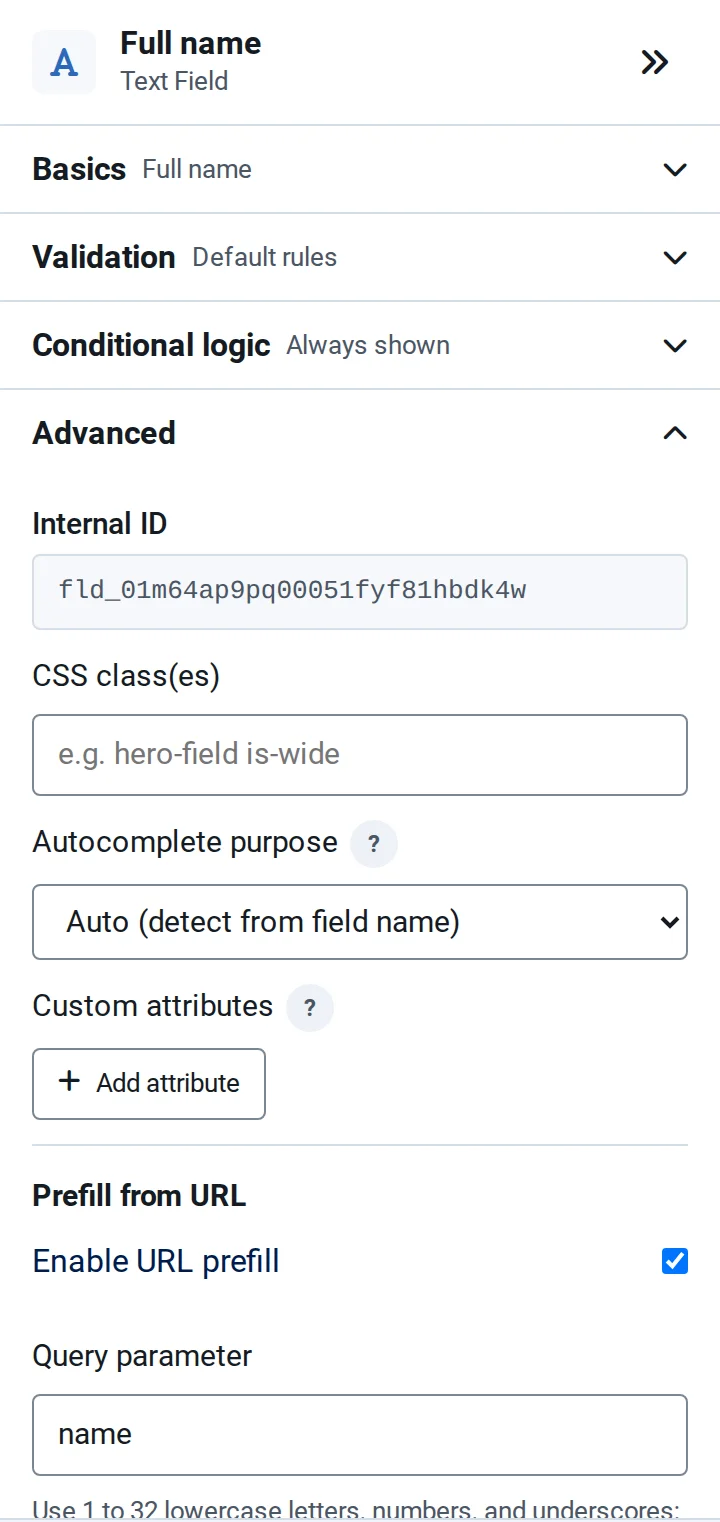
- Select the field and open Advanced.
- Under Prefill from URL, tick Enable URL prefill.
- Enter the Query parameter: the name used in the link, such as
name. Use 1 to 32 lowercase letters, numbers and underscores, starting with a letter. Names that Joomla or NXForms already use are refused. - For text fields, set the Maximum text length. Longer values from a link are cut to it.
Prefill works for Text, Email, Phone, Textarea, URL, Number, Slider, Hidden, Dropdown, Radio, Checkbox and Checkboxes fields. For choice fields, the value must match one of the options.
Good to know
- Values are suggestions. Visitors can change them, and NXForms checks them like anything typed.
- Don't put private data in links. Addresses end up in browser history, server logs and analytics. Never use prefill for passwords, consent or anything that grants access.
- Where it applies: forms shown as a menu item, in a module or in an article. It doesn't apply to forms in a popup, to the builder's preview, or when a visitor continues a saved draft.