

Appearance

Webhook Pro
Sends each entry as JSON to an address on your own system, signed so your system can check that it came from your site. It comes with NXForms Pro.
Set it up
In the form's settings, open Integrations and select Webhook.
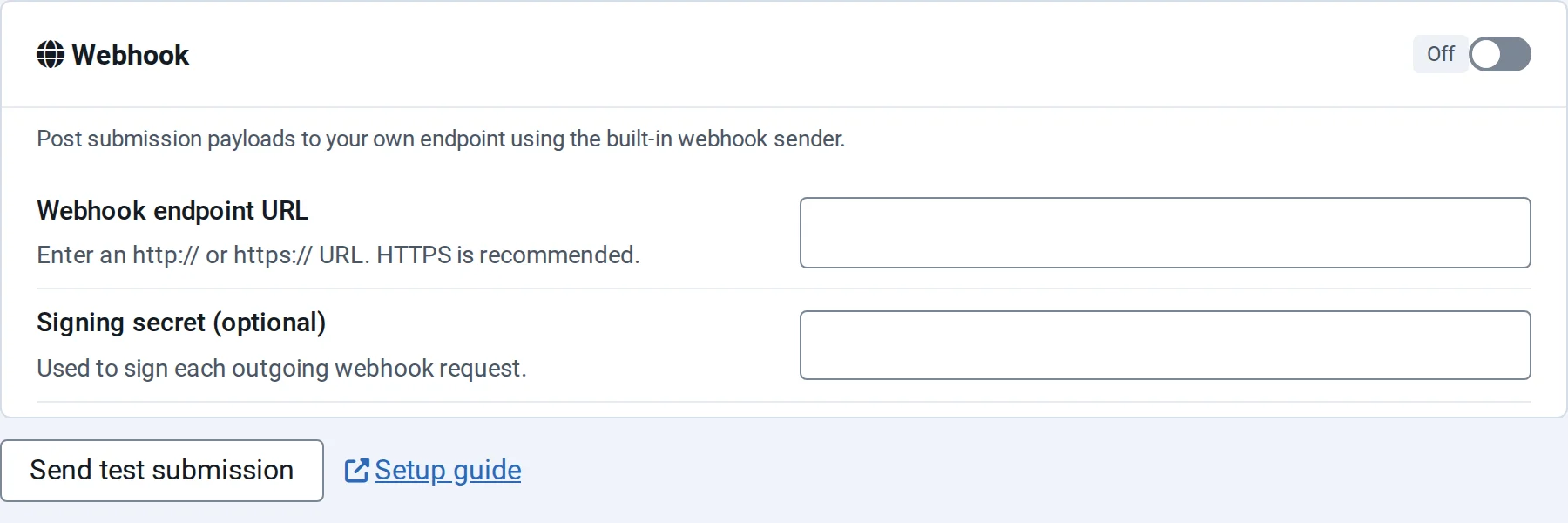
- Switch on Enable general webhook and enter the Webhook endpoint URL. Use an
https://address. Addresses on your local network, such aslocalhostor private IP addresses, are refused. - Enter a Signing secret (optional): a long random text that your system knows too. It's stored encrypted and isn't shown again: leave the box empty to keep it, or switch on Remove stored secret to delete it.
- Save the form, and select Send test submission to send an example.
What is sent
NXForms sends a POST request with Content-Type: application/json and this body:
json
{
  "form": { "id": 12, "title": "Contact us" },
  "submission": {
    "full_name": "Ana Petrova",
    "email_address": "ana.petrova@example.com"
  },
  "meta": { },
  "context": {
    "ip_address": "203.0.113.0",
    "user_agent": "Mozilla/5.0 …",
    "integration_id": "webhook"
  },
  "integration": "webhook"
}submissionholds the answers, keyed by each field's key. Password fields are masked, and uploaded files are sent as links.metadescribes the fields, such as their labels and types.contexthas the visitor's browser and IP address. The address follows the form's IP address storage: by default its last part is removed, as above, and it's empty when the form doesn't store addresses.
Check the signature
With a signing secret, each request has an X-NXForms-Signature header: the HMAC-SHA256 of the exact request body, keyed with your secret, in lowercase hexadecimal.
Compute it from the raw body as it arrived, before decoding the JSON, and compare it in constant time. In PHP:
php
$body = file_get_contents('php://input');
$expected = hash_hmac('sha256', $body, 'your signing secret');
$valid = hash_equals($expected, $_SERVER['HTTP_X_NXFORMS_SIGNATURE'] ?? '');A retry sends the same body with the same signature, so use the answers to spot a repeat if that matters to you.
If the stored secret can't be read, for example because the site's Joomla secret in its configuration changed, NXForms doesn't send the entry unsigned: it tries again and then gives up. Enter the secret again and save the form.
Answer the request
Answer with a 2xx status, such as 200, when you've received the entry. Error answers, or no answer within three seconds, count as a failure, and NXForms tries again: see When a service doesn't answer.